Loyalty Integration
Overview
The AiFi Loyalty Bridge API allows external loyalty systems to integrate with AiFi-powered autonomous stores. It enables stores to offer personalized rewards like points, balances, or product-based discounts using a small set of REST API endpoints and webhooks.
Shopper Journey – No Registration Flow
- Shopper taps credit card at the store entrance (via AiFi terminal).
- Shopper enters and selects some items.
- (Optional) Shopper scans a loyalty QR code or gift card inside the store.
- AiFi uses the loyalty code to link the session ID or customer ID.
- Shopper leaves the store.
- AiFi triggers the
cart-mutatorwebhook, containing the added customer/session metadata, so the client can respond with the relevant discounts. - AiFi processes the final payment.
- Shopper receives their receipt from the WebReceipt Portal.
Developer Integration Flow
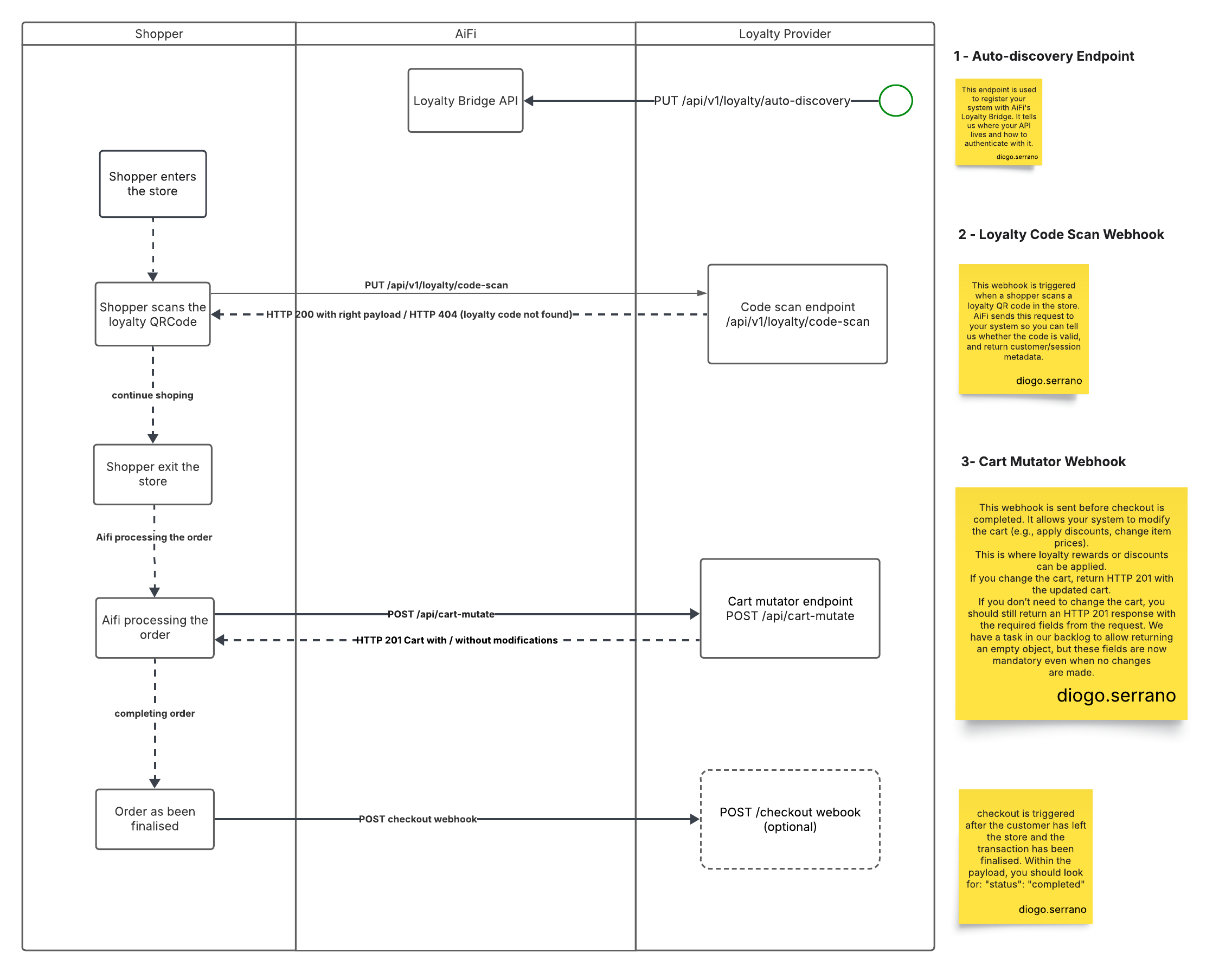
The following sequence outlines how shopper actions map to AiFi webhook calls.
-
Shopper enters the store.
-
(Optional) Shopper scans a loyalty QR code.
→
POST /api/v1/loyalty/code-scanwebhook is triggered immediately after the QR code scan. AiFi sends this webhook to attach customer or session metadata to the active session. -
Shopper shops and exits.
-
Before checkout, AiFi triggers the cart mutation process.
→
POST /api/cart-mutatewebhook is sent before checkout. Your system receives the cart and may respond in two ways:- Return a modified cart with discounts or adjustments (
HTTP 201) - Return the original payload unchanged (
HTTP 201)
- Return a modified cart with discounts or adjustments (
The cart-mutate webhook is mandatory for all integrations.
(Optional) A checkout webhook exists but is not required for loyalty integration.
API Endpoints
To integrate with the AiFi Loyalty Bridge API, your system must support the following three endpoints.
1. Discovery Endpoint
Method: PUT /api/v1/loyalty/auto-discovery
Used to register your system with AiFi’s Loyalty Bridge. This tells AiFi where your API lives and how to authenticate with it.
📋 View Example Request
{
  "providerName": "string",
  "url": "https://api.url.com/",
  "authorization": {
    "type": "bearer",
    "token": "1234"
  }
}
- Only Bearer authentication is currently supported.
- You should call this once when your service starts or whenever your configuration changes (e.g., rotating an API key).
2. Loyalty Code Scan Webhook
Method: POST /api/v1/loyalty/code-scan
Triggered when a shopper scans a loyalty QR code in the store. AiFi sends this request to your system so you can validate the code and return customer or session metadata.
The loyaltyCode and any additionalProps you return will later appear in the
cart-mutate webhook payload.
📤 Request Format
{
  "code": "string",
  "transactionReference": "string"
}
✅ Valid Code Response (200)
{
  "customer": {
    "loyaltyCode": "1234",
    "additionalProp1": "value",
    "additionalProp2": "value"
  },
  "session": {
    "loyaltyCode": "1234",
    "additionalProp1": "value"
  }
}
❌ Invalid Code Response (404)
{}
3. Cart Mutator Webhook
Method: POST /api/cart-mutate
Triggered before checkout. This allows your system to apply loyalty rewards or discounts by modifying the cart.
📥 Request Format
{
  "orderId": 1705,
  "sessionId": "some-unique-token",
  "customer": {
    "id": "42",
    "externalId": "my-customer-94325",
    "metadata": {
      "loyaltyCode": "ABCD1234"
    }
  },
  "session": {
    "metadata": {
      "events": [
        {
          "eventId": "uuid",
          "metadata": {
            "loyaltyCode": "123456"
          }
        }
      ]
    }
  },
  "storeId": 2,
  "storeExternalId": "mystore-0001",
  "cart": [
    {
      "barcode": "1201303",
      "category": null,
      "name": "Pepsi",
      "sku": null,
      "thumbnail": "https://aifigtins.blob.core.windows.net/product/1201303/1.jpeg",
      "id": "1",
      "externalId": "1201303",
      "price": 10,
      "quantity": 1,
      "taxLines": [],
      "totalTax": "0.99",
      "subtotalPrice": "10.00",
      "totalPrice": "10.99",
      "productSnapshot": {
        "id": 1,
        "name": "Pepsi, 12 fl oz",
        "weight": "1.00",
        "barcode": "1201303",
        "category": null,
        "sku": null,
        "thumbnail": "https://aifigtins.blob.core.windows.net/product/1201303/1.jpeg",
        "taxCode": null,
        "externalId": "1201303",
        "price": "10.00",
        "createdAt": "2025-07-11T00:59:15.972Z",
        "updatedAt": "2025-07-11T00:59:15.972Z",
        "productId": 1
      }
    }
  ],
  "totalPrice": "10.99",
  "totalTax": "0.99",
  "subtotalPrice": "10.00"
}
🛒 Modified Cart Response (201)
Return this format when applying loyalty discounts or modifications to the cart:
{
  "orderId": 1,
  "totalPrice": "30.00",
  "subtotalPrice": "28.00",
  "totalTax": "2.00",
  "cart": [
    {
      "id": "1",
      "externalId": 123,
      "quantity": 4,
      "totalPrice": "20.00",
      "subtotalPrice": "18.00",
      "totalTax": "2.00",
      "taxLines": [
        {
          "title": "Example",
          "rate": "0.1",
          "amount": "0.50",
          "taxId": "123"
        }
      ],
      "isDeposit": false
    },
    {
      "id": "2",
      "externalId": 1234,
      "quantity": 1,
      "totalPrice": "10.00",
      "subtotalPrice": "10.00",
      "totalTax": "0.00",
      "taxLines": [],
      "isDeposit": false
    }
  ]
}
➡️ No Changes Response (201)
If the cart doesn't need changes, return the same payload with HTTP 201:
{
  "customer": {
    "metadata": {
      "loyaltyCode": "ABCD1234"
    }
  },
  "session": {
    "metadata": {
      "events": [
        {
          "eventId": "uuid",
          "metadata": {
            "loyaltyCode": "123456"
          }
        }
      ]
    }
  }
}
Loyalty code data location
In the cart-mutate webhook payload, the scanned loyalty code is found in
either:
customer.metadatasession.metadata
Two Configuration Scenarios:
- If the QR scan is linked to the customer profile → the code appears in
customer.metadata - If the QR scan is for that specific visit/session → the code appears in
session.metadata
Loyalty Limitations
-
Endpoint Paths Are Fixed
- You must implement the following endpoints exactly as specified:
POST /api/v1/loyalty/code-scanPOST /api/cart-mutate
- You must implement the following endpoints exactly as specified:
-
Authentication Method
- Only Bearer tokens are currently supported
- Custom authentication methods aren't available
-
Customization
- Custom endpoint paths aren't supported in the current API version
- Standard webhook payload formats are required
- No flexibility for custom request/response structures