Payment integration
The AiFi Generic Payment Bridge connects external payment providers to the AiFi autonomous store ecosystem. This API supports pre-authorizations, captures, and refunds. It ensures that the transaction lifecycle stays unified across the shopper's journey.
Prerequisites
Before you start the integration, ensure that you meet the following requirements:
- AiFi account: You have an active AiFi retailer account with administrative access.
- HTTPS endpoints: Your payment system exposes HTTPS endpoints accessible from the public internet to receive push notifications and capture requests.
- Authentication credentials: You have the necessary API keys and provider secrets from your AiFi Account Manager.
- Webhooks configuration: You are familiar with the AiFi Webhooks system. While this guide covers payment-specific notifications, manage general webhooks in the Settings menu.
For details on configuring listeners, see the Webhooks documentation. For details on authentication for the GPB API, see the Authentication documentation.
Shopper journey: Card-based flow
You must understand the physical flow of the shopper to implement the API correctly:
- The shopper taps or inserts a card at the store entrance (via the AiFi terminal).
- AiFi requests a pre-authorization from your payment API.
- The shopper enters the store and selects items.
- The shopper exits the store.
- AiFi requests a capture or one-time payment for the final amount.
- AiFi triggers a refund if necessary (for example, for returns or pricing errors).
- The shopper receives a digital receipt from the WebReceipt Portal.
Developer integration flow
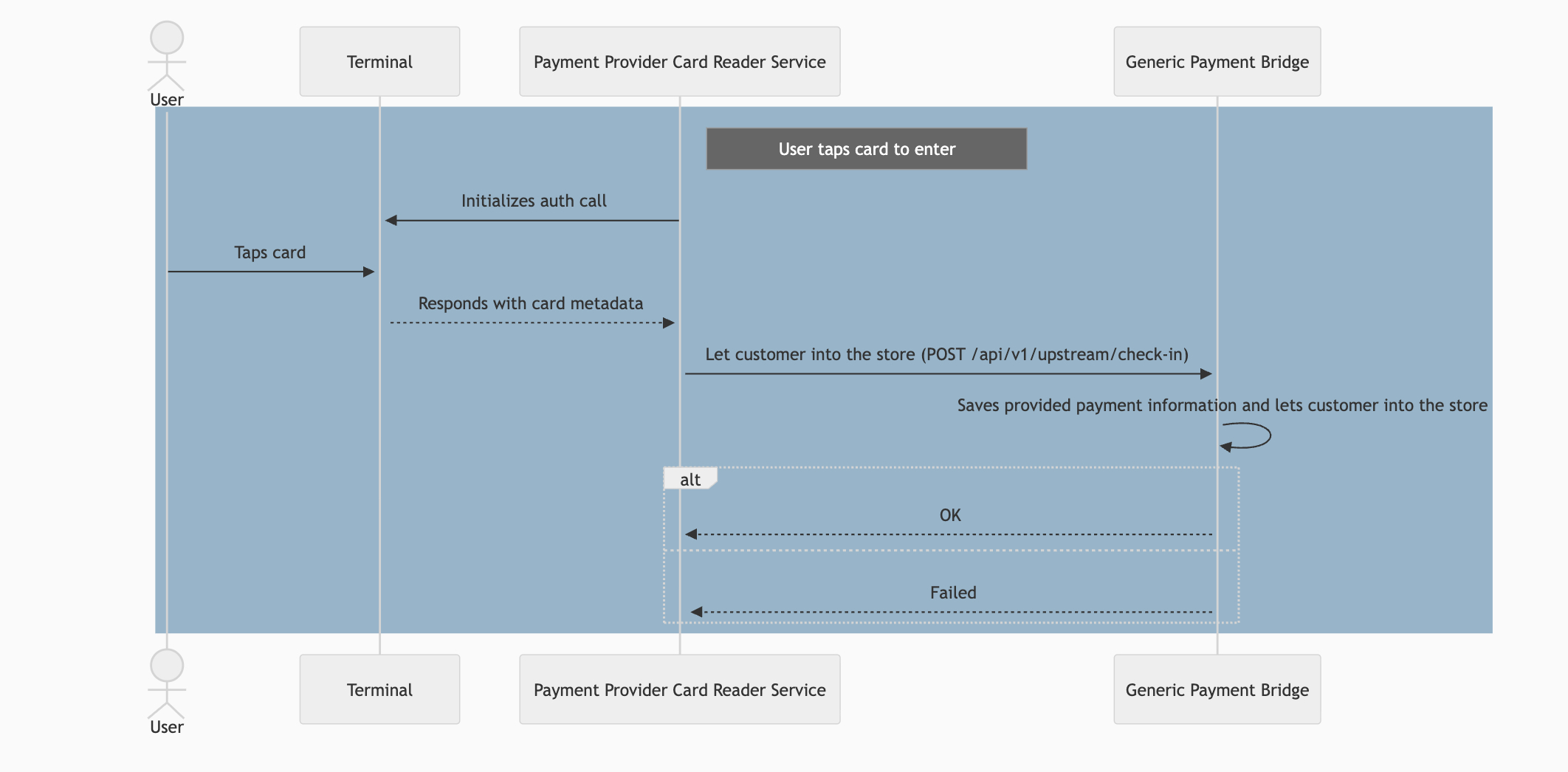
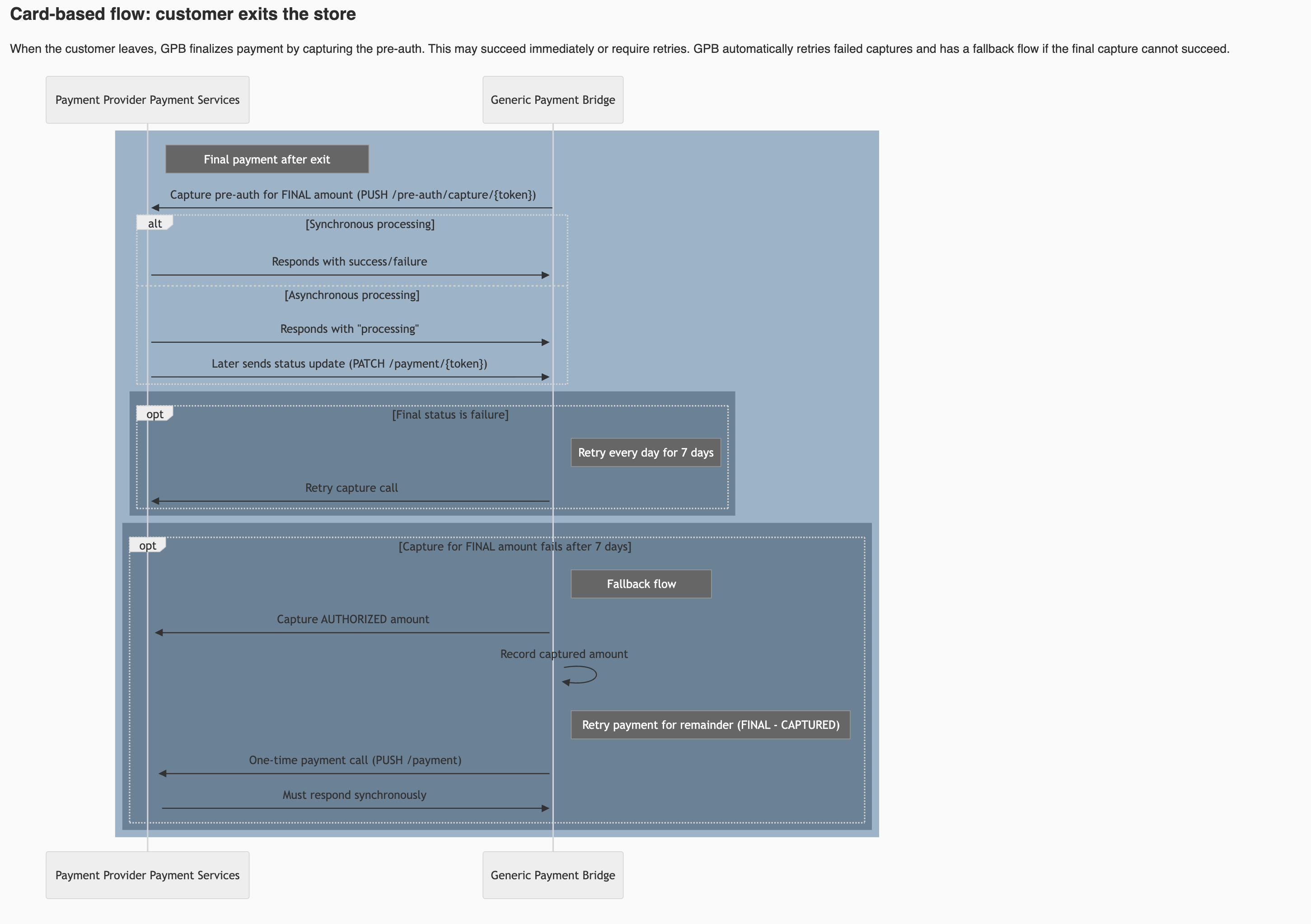
Follow these steps to register your provider and manage store entry.
Step 1: Register payment provider
Register your system with the Payments API. This allows AiFi to identify where to send payment operations.
PUT/api/v1/payment/auto-discovery
Step 2: Get payment terminals
Retrieve a list of payment terminals associated with your provider to verify connectivity.
GET/api/v1/upstream/payment-terminalsRetrieve terminals
Parameters: paymentProviderName={name}&enabled=true&offset=0&count=10
Response
{
  "data": [
    {
      "name": "terminal1",
      "description": "backup terminal",
      "id": "int-id",
      "externalId": "EXT-007",
      "address": "192.168.0.1",
      "paymentProviderId": 1,
      "enabled": true,
      "storeId": 101,
      "storeExternalId": "STR-EXT",
      "checkInDeviceId": 1,
      "registrationMode": "internal",
      "skipCardTokenization": true,
      "activateOnCall": true,
      "metadata": { "key": "value" },
      "createdAt": "2025-01-01T00:00:00Z",
      "updatedAt": "2025-01-01T00:00:00Z"
    }
  ],
  "pagination": {
    "previous": { "offset": 0, "count": 10 },
    "next": { "offset": 10, "count": 10 }
  }
}
Response data model
| Field | Type | Description |
|---|---|---|
| name | String | The internal name of the terminal. |
| externalId | String | The ID used by the external system. |
| address | String | IP address of the terminal. |
| storeId | Integer | The internal ID of the store. |
| registrationMode | String | The mode of registration (e.g., internal). |
Step 3: Enter the store
Call this endpoint after a valid card read. This action completes the following tasks:
- Creates the customer profile (if necessary).
- Saves payment information.
- Binds the pre-authorization.
- Creates a session.
- Starts registration.
Caution: Ensure the card.token and preAuth.id are valid before you call
this endpoint to prevent entry errors.
POST/api/v1/upstream/check-in
Request
{
  "terminalExternalId": "ext-123",
  "paymentProviderName": "NEW PROVIDER",
  "card": {
    "token": "card-token",
    "brand": "Visa",
    "type": "credit",
    "last4Digits": "2137",
    "bin": "457173",
    "expiryDate": "02/28",
    "extraData": "{\"firstName\":\"JOHN\",\"lastName\":\"DOE\"}"
  },
  "preAuth": {
    "id": "pre-auth-id",
    "amount": { "amount": 3000, "currency": "USD" },
    "emvData": "9F240512345678908A023030"
  }
}
Provider endpoints (callbacks)
AiFi sends requests to your system to process payments, update orders, or send notifications.
Pre-auth capture
AiFi requests this operation to capture the pre-authorization. This occurs when the shopper exits or when the final basket total is available. This is the primary PUSH call that follows the "check-in" action.
POST/pre-auth/capture/{preAuthId}
Request
{
  "orderId": "ORD-12345",
  "amountMinor": 4575,
  "currency": "USD",
  "products": [
    {
      "id": "1",
      "name": "Sandwich",
      "price": "4.00",
      "quantity": 1,
      "totalPrice": "4.60",
      "taxCode": "FOOD"
    }
  ]
}
Response (success)
{
  "status": "succeeded",
  "providerPaymentToken": "{preAuthId}",
  "amount": 15
}
Response (failure)
{
  "status": "failure",
  "providerPaymentToken": "{preAuthId}",
  "amount": 15
}
Response (processing/async)
{
  "status": "processing",
  "providerPaymentToken": "{preAuthId}",
  "amount": 15
}
Error
{
  "message": "Error message",
  "statusCode": 403
}
Refunds
AiFi uses this endpoint only if your system supports refunds initiated from AiFi. This supports partial or full amounts.
POST/payment/refund/:paymentId
Update order text
You call this upstream endpoint to update extra text on the shopper's receipt. This is useful for payment references, tips, or loyalty messages.
PATCH/api/v1/upstream/order/{orderId}
Request
{
  "extraText": "Paid with X Payment Provider — thank you for shopping!"
}
Update order status
Use this endpoint to update the status of an order when working with the asynchronous payment flow. It allows you to transition an order from processing to either paid or unpaid once the final payment result is known.
PATCH/api/v1/upstream/order/{orderId}
Request
{
  "status": "paid|unpaid"
}
Notification events
AiFi sends event notifications to your registered endpoint when specific configuration changes occur.
The primary event type for payment providers is terminal.updated. For a
complete list of supported webhook types and configuration instructions, refer
to the Webhooks documentation.
POST/notifications
Request
{
  "type": "terminal.updated",
  "id": "evt_01J0X",
  "data": {
    "externalId": "AIFI-TERMINAL-007",
    "enabled": true,
    "storeId": "store_123",
    "checkInDeviceId": "entrance_east"
  }
}