Branding
This page details the requirements and options to get the AiFi White Label App branded to your visual identity.
Example of Branded Apps
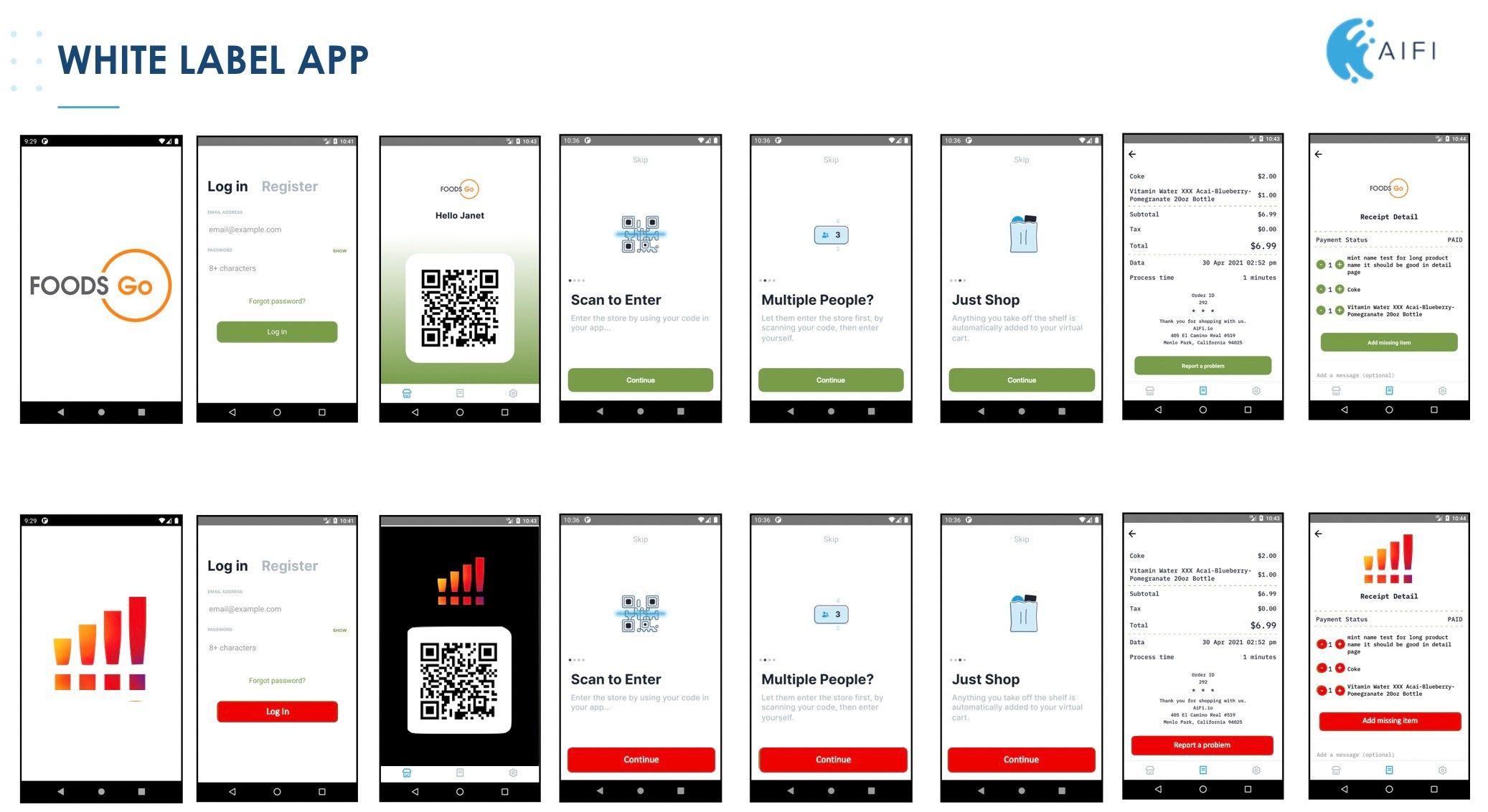
Requirements
In this section, you will find all the necessary requirements for AiFi to begin the development of your branded app. The process usually takes around two weeks, but it may take longer depending on potential additional requests from Google and/or Apple during their review process.
Colors
Clients can provide up to 3 colors to customize the app, all in HEX Code format. Examples include:
- Primary color (required)
- Secondary color (optional)
- A light or dark version of the primary color (optional)
Examples
| Color Type | HEX Code | Example Image |
|---|---|---|
| Primary Color | #179EDA |  |
| Secondary Color | #0C5170 |  |
| Light/Dark Version | #ACDF6 |  |
Logo in Splash Screen
Upon entering the app, there is a splash screen featuring the retailer’s logo.
- Image Requirements: At least 200px x 200px. Best format is SVG, but PNG/JPG is also acceptable.
- SVG Note: Ensure the SVG’s page is resized to the drawing (no white space around the drawing).
Texts
The following texts can be customized or translated to the local language.
Launching the App to the Store
How will the users see the app when it's available in the Google Play and App Store? Information needed includes:
- App’s Name
- App Image: 1 PNG image with 1024x1024px
- Launch Type: Should AiFi launch the app publicly (accessible to all users)
or privately (only users with given permissions)?
- If privately: AiFi needs the list of emails of each user and the operating system (Android, iOS) they will use.
Additional Requirements
These inputs are required but don't block AiFi from starting the app development.
- Logo Usage Permission: If using your logo in the Google/Apple Store, provide a letter of evidence granting AiFi permission to use it. This is required to launch the app in both stores.
- Privacy Policy: Provide a link to your privacy policy, which users can click and open.
- Terms & Conditions: Provide a link to your terms and conditions, which users can click and open.
- Stripe Keys: Provide Stripe public and secret keys for processing payments.
- Store Address: Provide the store address to be added to the Contact Us section and receipt details.
Optional
- FAQ Link: Provide a link to an FAQ section that can be attached to the app.
- Contact Information: Provide a contact number and email to be added to the Contact Us section.
- Customer Registration Information: Clients can request to turn on features
to collect:
- Company name
- NIP (Company Tax ID)