Overview
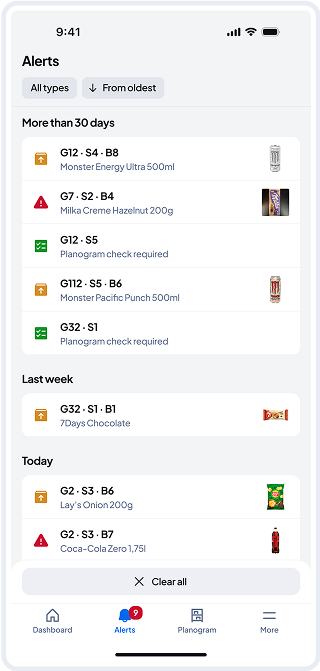
Alerts are notifications that inform users about issues requiring attention. These should be resolved as soon as possible to ensure the space operates correctly, as certain products may need immediate action.
Remember: keeping 100% of the planogram up to date is crucial to ensure all products in your store are in the correct locations.
Alert Types
-
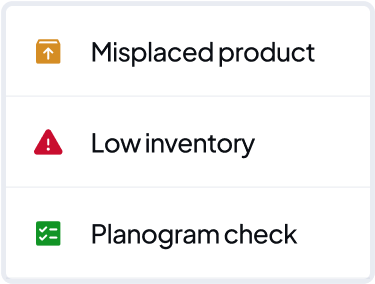
Misplaced Products: Triggered when the system detects that a product has been moved to the wrong location. If not corrected, it directly impacts the accuracy of the OASIS system, so it’s important to resolve these alerts as soon as they appear.
-
Low Inventory: Triggered when the number of products in a bin drops below a set threshold. This threshold can be configured by administrators.
-
Planogram Check: From time to time, the system may detect or suspect inconsistencies between the planogram and the actual shelf layout. When this happens, a Planogram Check alert is triggered to prompt a manual verification that the shelf contents match the planogram.
List of Alerts
In the Alerts section, you’ll see a list of all alerts sorted from oldest to newest, as we recommend resolving the oldest ones first to keep the system performing at its best. You can also quickly filter tasks to focus on what matters most.
Clear all
If alerts have piled up and you’re able to manually check the entire store — and you’re confident that:
- All misplaced products have been corrected
- The planogram in the store fully matches the version in the app
- You’re aware of low stock and have handled restocking — then you can clear all alerts at once.
However, we don’t recommend using this option if you only have a few alerts. To keep the system working at its best, resolve alerts daily, one by one or as often as possible.