Webhooks
The Webhooks feature is available starting from OASIS version 6.3.0. For older versions, please contact support to create/manage webhooks.
Overview
Webhooks allow retailers to receive real-time notifications from AiFi systems when specific events occur, such as customer checkouts, cart adjustments, or entry validation. These events can be used to synchronize with POS systems, analytics pipelines, loyalty programs, or external payment processors.
Accessing the webhook management section
- Log in to the AiFi Console.
- Select the appropriate retailer from the dropdown in the top-right corner.
- From the left-hand navigation, go to Settings → Webhooks.
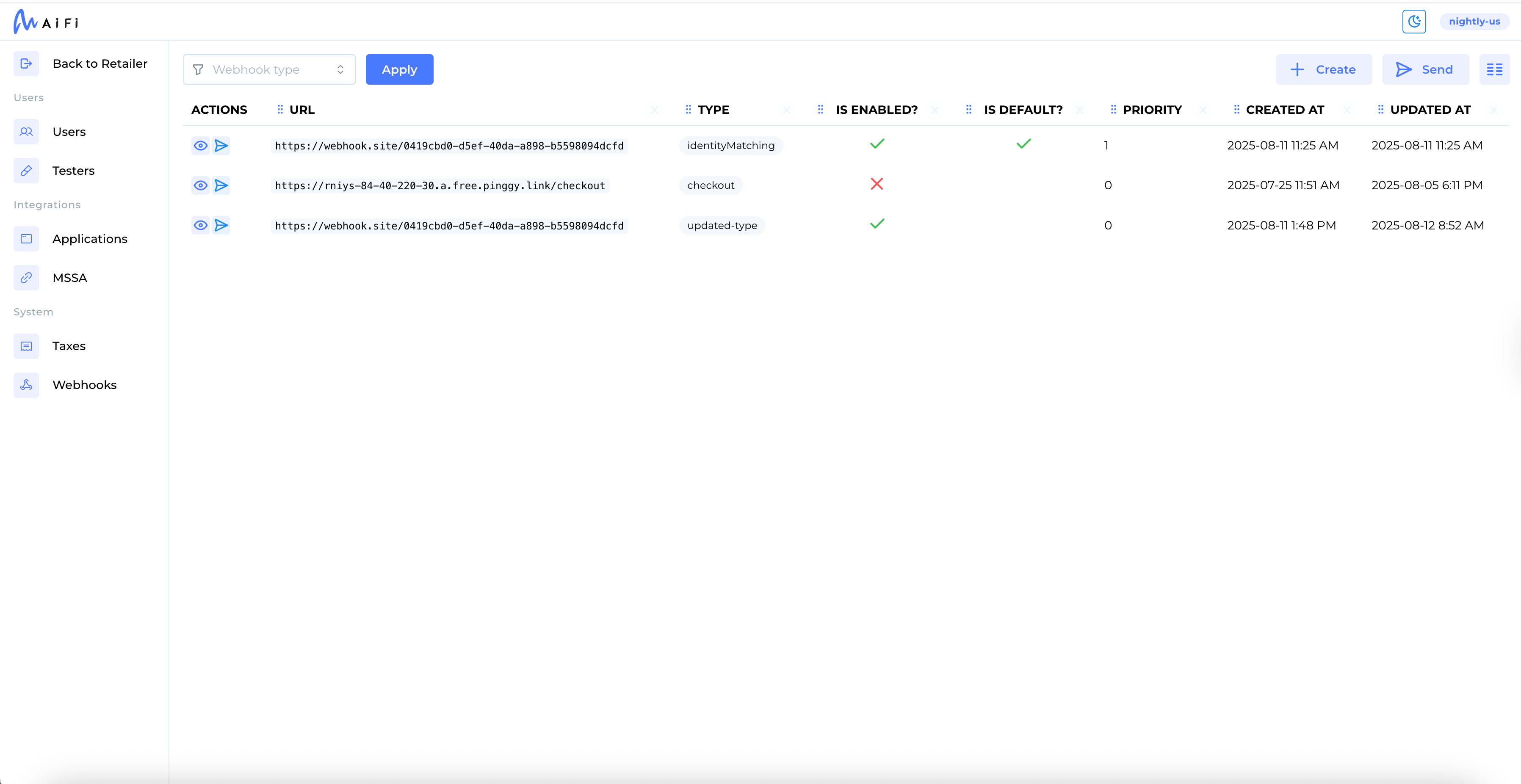
Webhook configurations are retailer-scoped. Switching retailers will display a different webhook list.
Permissions
Only users with the appropriate role can access webhook management. If you don’t see the Webhooks menu, contact your AiFi Account Manager to request access.
Viewing and filtering webhooks
On the Manage Webhooks page, you can:
- View a list of configured webhooks.
- See each webhook’s:
- Type
- Target URL
- Status (enabled/disabled)
- Priority
- Use the type filter dropdown to narrow the list by category (e.g.,
checkout,checkoutZone).
Supported webhook types
| Type | Description |
|---|---|
checkout | Sent when a shopper leaves the store. First with status=draft and then status=completed. Includes basket, tax, and payment info. |
cartMutator | Called before checkout finalizes. Retailers can modify the basket and return updated totals. |
checkoutZone | Real-time entry/exit of shoppers in store zones. Supports buffered and unbuffered mode. Includes session IDs and optional specialAttention. |
transitions | Triggered when a shopper or group exits the store and the checkout process begins. |
externalEntry | Invoked to verify entry codes with an external system before allowing access. |
Additional types may appear in your configuration, such as priceCalculator,
tracking, identityMatching, or suspectedFraud. These are internal and may
not be customer-configurable. Contact support if unsure.
Creating a new webhook
- Select + New Webhook.
- Fill in the following:
| Field | Description |
|---|---|
| Type | Select one of the supported webhook types. Must be unique per webhook. |
| Target URL | The destination endpoint (must use HTTPS). |
| Priority | Determines execution order. Lower numbers run first. |
| Enabled | Toggle to activate or deactivate the webhook. |
| Headers | Optional key-value pairs for authentication (e.g., Authorization: Bearer <token>). |
Multiple webhooks of the same type are supported. Priority determines the order of execution.
Editing, disabling, or deleting webhooks
- Select the edit icon to update an existing webhook’s settings.
- Use the toggle to disable a webhook without deleting it.
- Use the trash icon to permanently remove a webhook.
Changes take effect immediately.
Some webhook types may be used internally by AiFi systems (e.g., tax or loyalty handling). Changing priorities or disabling these may impact store operations. Contact support if you're unsure.